I’ve been using AI coding agents heavily for the past several months, and the experience has been great, except for one thing: these tools have no sense of boundaries.
I don’t mean that metaphorically. I mean I’ve watched coding agents leave my project directory for reasons I still can’t explain. I’ve seen them try to access my home directory. When you’re deep in a flow state, trusting an agent to execute a plan you’ve agreed on, discovering it’s been poking around in places it has no business being is unsettling. It breaks trust.
I wanted a setup where the agent physically cannot wander. Where the only files it can see are the ones I’ve chosen to expose. And while I was at it, I wanted a full team of specialized agents. Not a single do-everything assistant, but something closer to how real engineering teams operate.
The result is opencode-sandbox: a Dockerized AI coding environment with a built-in team of agents, each with scoped permissions, that adapts to whatever tech stack it finds.
And in a satisfying bit of recursion, the agent team largely built the project itself. It also helped produce the new iteration of this website, which was the more important test. I didn’t just want a system that could work on its own codebase. I wanted something I could trust on real work.
Docker as a Hard Boundary
The core insight is simple: instead of configuring an agent to stay in its lane, make it impossible for it to leave.
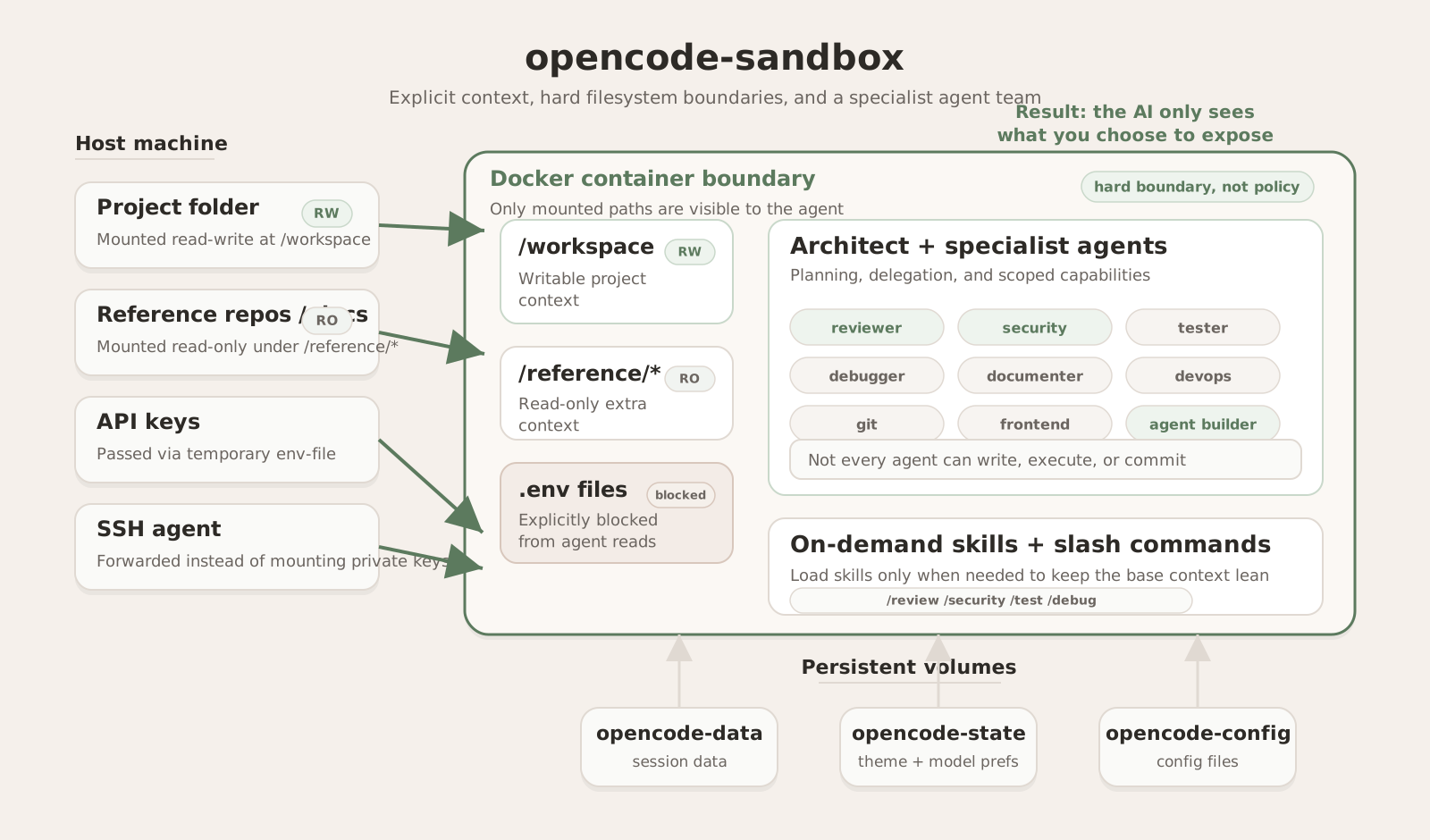
When you run opencode-sandbox, your project gets mounted at /workspace inside a Docker container. That’s the agent’s world. It has full read-write access there, and nowhere else. If you want the agent to reference another project, like a shared library, an API contract, or a design system, you mount it explicitly with the --ref flag, and it shows up read-only.
opencode-sandbox -r ../shared-lib -r ../api-contracts ~/projects/myappEverything not mounted simply doesn’t exist from the agent’s perspective. There’s no home directory to wander into, no dotfiles to read, no system configs to stumble across. The isolation isn’t a policy the agent might violate. It’s a physical constraint.
This security thinking extends to smaller details too. API keys are passed into the container via a temporary env-file rather than -e flags, so they never appear in host process listings. The container runs as a non-root user with UID/GID matched to the host. .env files inside the workspace are explicitly blocked from agent reads to prevent accidental secret exposure. These are small things individually, but they add up to an environment where you can let the agent work without watching over its shoulder.
Why OpenCode
I built this on OpenCode because it already had the two things I didn’t want to build myself. The TUI is solid. When the agent needs input from you, you get interactive prompts that guide you through providing answers rather than just a question dumped into the chat. That matters when you’re spending hours in a tool.
More importantly, OpenCode has a custom agent system that’s flexible enough to support distinct roles, permission scopes, and even different models per agent. It also gives you access to models from multiple providers, including Claude, OpenAI, and others, at no markup on the API costs. The sandbox wouldn’t work without a runtime that supports that kind of customization, and OpenCode gave me that out of the box.
A Full Engineering Team, Not a Single Agent
The sandbox ships with a primary orchestrator, the architect, and nine specialist agents. The architect handles planning, delegation, and integration. The specialists each own a domain:
- A code reviewer that can read your code but can’t modify it
- A security analyst that audits vulnerabilities and threat models, also read-only
- A tester that generates tests and analyzes coverage
- A debugger for systematic root cause analysis
- A documenter that can write docs but only has read-only shell access
- A devops specialist for Docker, CI/CD, and infrastructure
- A git manager that can commit and branch but is restricted to git operations
- A frontend specialist for UI, styling, and accessibility
- An agent builder that creates and reviews other agents
The interesting design choice here isn’t the specialization itself. It’s the permission model. The code reviewer cannot modify your code. The git manager cannot run arbitrary shell commands. The documenter can write files but can’t execute things. This mirrors how real teams operate: not everyone has production access, and for good reason. It’s the same principle as defense in depth, just applied to AI agents.
All of the agents are language-agnostic. They adapt to whatever tech stack they find in the workspace, so the same team works whether you’re writing a Go service, a React app, or a Python CLI tool.
Lazy-Loaded Skills and Slash Commands
Rather than stuffing every agent’s system prompt with everything it might need to know, the sandbox uses lazy-loaded skills, which are markdown files containing procedural knowledge that agents pull in on demand via a skill tool.
There are skills for git conventions, test strategy, code review checklists, security analysis frameworks, debugging methodology, documentation templates, Docker best practices, CI pipeline patterns, frontend patterns, and agent authoring itself. An agent only loads what it needs for the current task, keeping the base context lean.
On the user-facing side, slash commands provide ergonomic entry points: /review for code review, /security for a security assessment, /test to run and analyze tests, /debug to start a debugging session, and so on. They’re shortcuts into the agent team’s capabilities.
The Hard Part: Configuration Persistence
Honestly, the most time-consuming part of this project wasn’t the agent design or the Docker isolation. It was getting configuration persistence right.
A Docker container is ephemeral by default. That’s the whole point for isolation purposes, but it creates a real problem for a coding environment: you don’t want to lose your theme selection, model preference, and prompt history every time you restart. You also don’t want to rebuild the image every time you tweak a setting.
This took real trial and error. The solution I landed on uses three separate Docker named volumes: one for session data (opencode-data), one for user state like theme and model preferences (opencode-state), and one for configuration files (opencode-config). The global config and rules are baked into the Docker image and seeded into the config volume on first run, but user edits to those files persist across restarts.
Meanwhile, agents, skills, and slash commands are bind-mounted read-only from the repo. This means you can edit an agent definition, restart the container, and see the change immediately without rebuilding. It’s a small thing, but it makes the iteration loop fast enough that you actually experiment with agent designs instead of treating them as set-and-forget.
Getting this layering right (what’s baked in, what’s mounted, what persists, what’s ephemeral) was the kind of work that doesn’t look impressive in a README but makes the difference between a tool you use once and a tool you live in.
The Meta Moment: The Agents Built This
This is my favorite part: the agent team in this project was largely built by agents.
I started with OpenCode’s default agents, installed locally on my machine with no sandbox yet. Using OpenCode’s plan mode, I described the concept: create a Docker container with OpenCode installed that can have a workspace mounted into it. The first design it proposed was based on Docker Compose, which wasn’t quite what I wanted. So we iterated. Back and forth, refining the approach, until we landed on the script-driven design you see today: a single launcher script that handles image building, volume management, and mount configuration.
Once the basic script and container were in place, I started working from inside the sandbox, using it as my development environment. This is where it gets recursive. I had the default agents build out an initial set of seven specialist agents. They wrote the agent definitions, the system prompts, the permission scoping, all of it.
Then I added the security analyst agent. And that’s when a thought occurred to me: what if I created an agent whose specialty was building agents? An agent that understood best practices for system prompt design, permission scoping, and skill authoring? So I created the agent builder — and then pointed it at the other eight agents to review and improve them.
I love that loop. You build a tool, use the tool to improve itself, and end up with something better than you could have designed in one pass.
When I used the system to build the new version of my website, the experience felt different from the early iterations on the sandbox itself. I wasn’t guiding as much. The agents knew their roles, stayed in their lanes, and produced work I could actually ship. That was the point where this stopped feeling like an interesting experiment and started feeling like a real environment.
Try It Yourself
If any of this sounds useful, the project is open source under the MIT license:
git clone https://github.com/crallen/opencode-sandbox.git
cd opencode-sandbox
ln -s "$(pwd)/bin/opencode-sandbox" ~/.local/bin/opencode-sandbox
ANTHROPIC_API_KEY=sk-... opencode-sandbox ~/projects/myapp
You just need Docker. If you have an API key set in your environment it will be passed through, but you can also log in to your provider directly from the TUI once it’s running. The image builds automatically on first run.
What’s Next
This project is still evolving. A few things on the roadmap: adding more language runtimes to the container so agents can actually run and test code in more stacks out of the box, making the project easy to use with Docker Compose for folks who prefer that workflow, and publishing a pre-built image so you can skip the initial build entirely.
If you try it out, I’d love to hear what works and what doesn’t. I’m using it daily and still finding things to improve.